What’s new in version 24.13
We’ve deployed a turnkey solution for accounts that require the ability to introduce one or more surcharges on their billing forms and invoices. This feature will require the assistance of our Professional Services team to deploy to your account. Please reach out to support for more information.
Surcharges
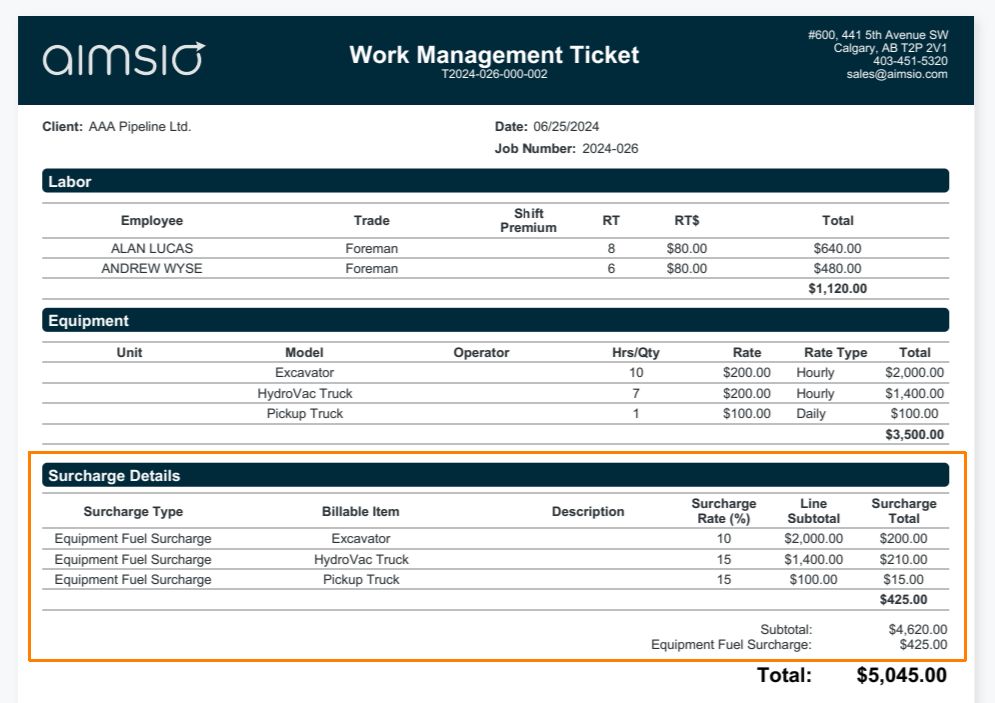
Surcharges can now be applied to specific Price Book items or form totals. Examples of surcharges may include a Fuel Surcharge, Environmental Surcharge or any charge applied in the form of a percentage on top of your billing rates.
The process involves creating a new Surcharge Billable Item type, then adding that Surcharge item to a Price Book. Once the Surcharge Billable Item is added to a Price Book, users will indicate which items on that Price Book the surcharge applies to.
We’ve built in flexibility for how this surcharge is presented on forms and invoices, so when you’re completing your Estimate, Ticket or Change Order, you’ll have the flexibility to display a detailed breakdown of these charges to your customers, or simply a single charge.
For a detailed walkthrough on how our new surcharge function is handled in Aimsio, please review the following article on our Product Guide: How to Add Surcharges